Seven Casino App: A Home-Screen Shortcut, Nothing to Download
Seven Casino mobile site shortcut
Free
Nothing to download
iPhone: Safari
Android: Chrome
12 languages
The Seven Casino app is a shortcut to the mobile site, not an application. Seven Casino has no listing in the App Store or Google Play and no APK file, because every game runs in the phone's browser. On an iPhone you add the icon through Safari: Share, then Add to Home Screen. On Android you open the Chrome menu and pick Add to Home screen. Nothing is downloaded: the icon just opens the site. You sign in with the same email and password as on a computer, so the slots, live tables, sportsbook and Predictions of Casino Seven online sit one tap away on your home screen.
Join in the bottom bar opens sign-up, with 450% up to €7,500 for slots or 300% up to €3,500 for sports.
The Shortcut at a Glance: Size, Platforms, Account
Key facts about the Seven Casino shortcut:
The Shortcut at a Glance: Size, Platforms, Account
Detail
Seven Casino shortcut
What it is
An icon on your home screen that opens the Seven Casino mobile site
What gets downloaded
Nothing: no app, no APK, no game files
Where it comes from
Safari on an iPhone or iPad, Chrome on Android
App Store and Google Play
Not listed
Devices
Smartphones and tablets
Account
The same email and password as on desktop
Languages
12, among them English, German, Spanish and French
Updates
None to install: each launch loads the current site
Cost
Free
Because the icon only points to the website, it adds no features the site lacks and takes none away. Remove it, and your account, balance and bonuses stay exactly where they were.
Adding Seven Casino to an iPhone Home Screen With Safari
iOS runs on a little over half of the phones in UK mobile traffic, so this route comes first. Use Safari, Apple's own browser, and follow its Share menu.
1Open Safari and load the Seven Casino mobile site with the Open the Mobile Site button above.
2Wait until the bar with Casino, Live, Join, Search and Promo appears at the bottom.
3Tap Share, the square with an arrow pointing up. On newer versions of iOS it may sit behind the three-dot button beside the address.
4Scroll down the share sheet and tap Add to Home Screen.
5Keep the suggested name or type a shorter one, then tap Add.
6Go back to the home screen, find the new icon among your apps and tap it to open the site.
If Add to Home Screen is missing from the share sheet, scroll to the very bottom, choose Edit Actions and add it to the list. An iPad follows the same steps.
Android Phones: The Chrome Menu Route to a Home-Screen Icon
On Android the shortcut comes from Chrome, the browser most phones ship with.
1Open Chrome and load the mobile site through the same Open the Mobile Site button.
2Tap the three dots in the top right corner to open the menu.
3Choose Add to Home screen.
4Check the name in the pop-up and tap Add. Some phones then ask you to confirm or to drag the icon to a spot of your choice.
5Return to the home screen and tap the new icon.
Other Android browsers, Samsung Internet among them, keep a similar option in their own menu under slightly different wording.
Why a Seven Casino Download Is Not in App Store or Google Play
Seven Casino does not publish a native app in either store and does not offer an APK. All games run in browser mode, with no need to download any software. Even so, a search for a Seven Casino download turns up files and listings the brand never made. Some search results dress pages on unrelated domains up as "Apps on Google Play" cards.
Treat any of the following as unofficial:
an APK or iOS file offered under the Seven Casino name;
a store listing called Seven Casino or Seven Casino app;
a page that asks for your Seven Casino password before showing the site;
a message promising an "app-only" bonus, since every offer sits on the Promotions cards.
If a link or a message asks for your password or looks doubtful, ask Live chat, open 24/7, before entering anything. A shortcut you make in your own browser installs no code at all: it is a bookmark with an icon.
Casino, Live, Join, Search, Promo: Finding Your Way on a Phone
Once the icon opens the site, most moves happen in the bar along the bottom. It has five tabs:
1Casino
2Live
3Join
4Search
5Promo
Casino: the slots lobby.
Live: the live dealer lobby, laid out the same way.
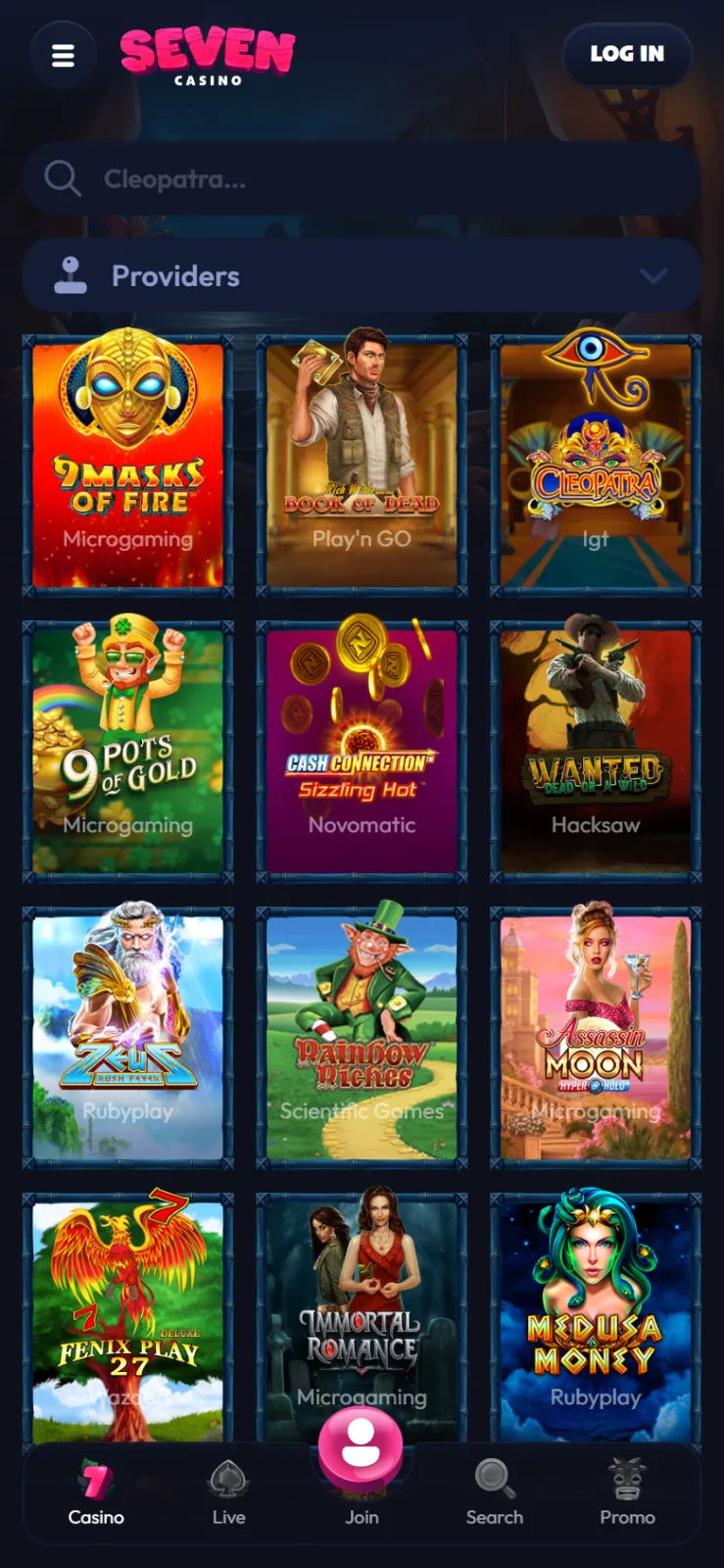
The three-line icon in the top left corner opens the full menu: Home, Casino, Live Casino, Sports, Predictions and Promotions. Below them is a short Popular games list with Bar Blackjack 3, 9 Masks of Fire and Book of Dead, and at the bottom a language switch with buttons for Live chat and help. Log in stays in the top right corner on every screen.
Slots and live tables on a small screen
The lobby shows three tiles per row, each with the game's name and studio, under a search field and a Providers filter. The Seven Casino games are the same as on desktop: 9 Masks of Fire, Book of Dead, Cleopatra and Wanted Dead or a Wild sit at the top. In the Live tab you will find tables from Winfinity Live, Iconic21, 7Mojos Live, XPG, Vivo and JackTop.
The sportsbook on a phone
Sports swaps the bottom bar for its own: Sports, In-Play, Bet Slip, Esports and Menu. A row of icons at the top switches between search, live events and single sports. Prices are shown as fractions, such as 7/2.
What Your Phone Needs Before You Tap the Icon
The shortcut asks little of a phone, because the website does the work inside the browser. Check these points before the first session:
A current browser. Safari updates together with iOS, and Chrome updates through Google Play.
Free space. Next to none. No games or app files are stored on the phone, only the icon and the browser's usual cache.
A connection. Wi-Fi, 4G or 5G. Games and odds load live, so there is no offline mode.
Battery and data. Live dealer tables stream video and use far more of both than slots do. For a long session at a roulette table, Wi-Fi and a charger help.
Account, Cashier and Limits When You Play From Your Phone
The icon opens the same account you use on a laptop. To log in to Seven Casino on a phone, tap Log in and enter your email and password: your balance and active bonus appear as you left them.
The cashier is the same: cards, e-wallets, bank transfer and cryptocurrency. The account is held in euros, so every amount on the phone shows in €, and withdrawals run from €100 up to €1,000 a day and €10,000 a month, usually within 3 banking days.
Verification starts at €2,000 in deposits or at the first withdrawal. The phone camera is enough to capture the documents, which go through the profile or by email, and checks usually take up to 48 hours.
Limits belong to the account, not the device. A deposit limit, a loss limit or a cool-down of 1 to 48 hours covers the phone and the computer alike. With the casino one tap away, set one before the first session. If play stops being fun, the National Gambling Helpline on 0808 8020 133 is free and open 24/7.
No. There is nothing to update, because each tap loads the site as it is that day. New games and Promotions cards appear without any action from you. Keeping Safari or Chrome up to date is the only maintenance.
How do I remove the icon?
Press and hold it on the home screen and choose the remove option your phone offers. This deletes only the shortcut. Your Seven Casino account, balance and any active bonus are untouched, and you can add the icon again later in the same way.
Does it work on an iPad or an Android tablet?
Yes. The site is built for smartphones and tablets, and the steps are the same: Safari and Add to Home Screen on an iPad, the Chrome menu on an Android tablet.
Are the bonuses different when I play through the shortcut?
No. There are no app-only offers. The slots and sports welcome packages and the five weekly offers are the same on every device, and on a phone you claim them under Promo in the bottom bar.
Will the shortcut send me notifications?
No. A home-screen shortcut is a bookmark, so it has no way to push alerts to your phone. Offers appear on the Promotions cards, and reach you by SMS or email only if you ticked the optional marketing box at sign-up.
Can I add the icon on two phones?
Yes. The same login works on every phone or tablet where you add the shortcut. Keep to one account, though: each person may hold only one.